“Passkeys will eliminate passwords.” This is technically true, and this shortcut misses everything that matters for a real production deployment.
FIDO2 and passkeys represent a genuine paradigm shift in authentication. But deploying them in a production environment, on a real user base, with all the edge cases that entails, is a different project from the demos that convinced you.
What FIDO2 Actually Is
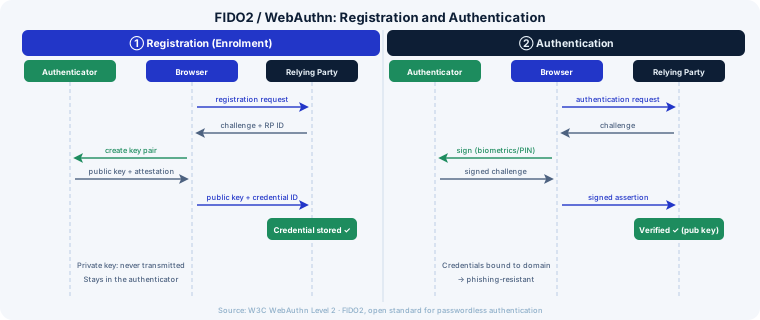
FIDO2 is a W3C standard (WebAuthn) combined with the CTAP protocol (Client to Authenticator Protocol). It enables passwordless authentication based on public key cryptography:
- At registration: the authenticator (device, hardware key, or platform) generates a key pair. The private key stays on the device, the public key is stored server-side.
- At authentication: the server sends a challenge, the authenticator signs it with the private key, the server verifies the signature with the public key.
No shared secret. No network-transmitted password. No password database to steal.
Passkeys are the evolution that makes FIDO2 usable for the general public: the key pair is synchronized in the cloud (iCloud Keychain, Google Password Manager, Windows Hello) and becomes accessible across multiple devices of the same ecosystem.
The Real Questions to Resolve Before Deploying
Fallback: What Happens Without a Compatible Device?
Your user base is heterogeneous. Some use old Android devices, corporate computers locked down by security policy, or browsers that don’t support WebAuthn (still 5-8% depending on your audience).
You cannot remove the password path on day one. A robust deployment strategy maintains password + FIDO2 in parallel for an extended transition period, then progressively migrates users.
The migration funnel to anticipate:
- Passkey registration proposed (not imposed) at login
- Passkey as default if registered
- Password as fallback still accessible
- Proactive migration of users who haven’t adopted after N months
Account Recovery: The Critical Scenario
The user loses their phone. Or they replace it. Or they were exclusively on iOS and switch to Android.
Without a password, the account recovery mechanism becomes the privileged attack vector. The classic weakness: a recovery by email is less secure than the FIDO2 you wanted to protect.
Options to consider:
- Multiple enrolled authenticators (phone + hardware key): recommended for high-risk accounts
- Recovery codes generated at enrollment: stored offline, one-time use
- Identity verification with human intervention: expensive but sometimes unavoidable for high-value accounts
- Trusted device management: enroll N devices with cross-validation
No universal solution. The right answer depends on your user profile, acceptable risk, and support capacity.
Synced vs Bound Passkeys
Two types of passkeys coexist:
Device-bound passkeys (tied to a hardware key like a YubiKey): the private key never leaves the physical device. Maximum security, zero synchronization. Suitable for high-privilege accounts (administrators, financial operators).
Synced passkeys (synchronized via iCloud/Google/Windows): convenient, multi-device, but the private key transits through the OS vendor’s infrastructure. Security depends on the cloud account’s own security. Sufficient for most consumer use cases.
In a B2B environment with strict security requirements, the choice between the two is a regulatory and risk decision, not just technical.
Enterprise Deployment: The SSO Complexity
If you have a Workforce IAM (Okta, Azure AD, Ping Identity), FIDO2 integration depends on IdP support. The situation in 2024-2025:
- Azure AD / Entra ID: native FIDO2 support, hardware keys and passkeys supported
- Okta: FastPass supports passkeys, rollout by tenant
- Google Workspace: support in deployment for managed accounts
Verify the exact version of your IdP and its current passkey capabilities before committing to a timeline.
Implementation: The Technical Points
Attestation vs No Attestation
At registration, the authenticator can provide an attestation, a cryptographic proof of its identity (model, manufacturer, firmware). This allows:
- Verifying you’re dealing with a certified FIDO2 authenticator
- Filtering out non-compliant authenticators (relevant in high-security B2B contexts)
For a consumer B2C deployment, attestation is generally not necessary and complicates the flow without added value.
Roaming Authenticators and Cross-Device Authentication
WebAuthn supports cross-device authentication: authenticating on a desktop using your phone as an authenticator (via Bluetooth/QR code). Particularly useful for users without a hardware key and who want to add their phone as a second device.
Support varies by browser/OS. Test your specific scenarios before including this in your UX.
Resident Keys vs Non-Resident Keys
A resident key (Discoverable Credential) stores the credential identifier on the authenticator. This enables “username-free” authentication: the user doesn’t type their email, the authenticator presents the right credential.
Improvement to user experience but requires authenticator support and limits the number of stored credentials on hardware keys (often limited to 25-50 slots).
A Realistic Deployment Roadmap
Phase 1 (months 1-2): Foundation
- WebAuthn server-side implementation (WebAuthn4J, py_webauthn, or equivalent)
- Registration and authentication flows with FIDO2
- Parallel maintenance of password flow
- Automated testing of all critical scenarios
Phase 2 (months 2-4): Progressive rollout
- Beta rollout to 5% of users
- Monitoring of adoption rates, errors, fallback calls
- Recovery flow iteration based on feedback
- Support team training on new processes
Phase 3 (months 4-6): Generalization
- Progressive deployment to 100%
- Proactive migration campaign for users who haven’t adopted
- Post-deployment metrics: adoption rate, MFA abandonment, security incidents
Conclusion
FIDO2 and passkeys are the right answer to password security problems. But “the right answer” and “a simple deployment” are two different things.
The complexity is not in the cryptography: the libraries handle it. It’s in account recovery, device management, fallback for excluded users, and integration with your existing identity ecosystem.
A well-executed deployment significantly reduces phishing risk and improves user experience. A poorly executed deployment creates new vulnerabilities around recovery flows.
Designing a progressive rollout to FIDO2, keeping recovery procedures battle-tested: digital trust and software development.